
82 lines
2.3 KiB
Markdown
82 lines
2.3 KiB
Markdown
# x-ui
|
||
支持多协议多用户的 xray 面板
|
||
|
||
# 关于抄袭本项目的嫌疑人: https://github.com/vaxilu/x-ui/pull/158
|
||
|
||
# 功能介绍
|
||
- 系统状态监控
|
||
- 支持多用户多协议,网页可视化操作
|
||
- 支持的协议:vmess、vless、trojan、shadowsocks、dokodemo-door、socks、http
|
||
- 支持配置更多传输配置
|
||
- 流量统计,限制流量,限制到期时间
|
||
- 可自定义 xray 配置模板
|
||
- 支持 https 访问面板(自备域名 + ssl 证书)
|
||
- 更多高级配置项,详见面板
|
||
|
||
# 安装&升级
|
||
```
|
||
bash <(curl -Ls https://raw.githubusercontent.com/vaxilu/x-ui/master/install.sh)
|
||
```
|
||
|
||
## 手动安装&升级
|
||
1. 首先从 https://github.com/vaxilu/x-ui/releases 下载最新的压缩包,一般选择`amd64`架构
|
||
2. 然后将这个压缩包上传到服务器的`/root/`目录下,并使用`root`用户登录服务器
|
||
|
||
> 如果你的服务器 cpu 架构不是`amd64`,自行将命令中的`amd64`替换为其他架构
|
||
|
||
```
|
||
cd /root/
|
||
rm x-ui/ /usr/local/x-ui/ /usr/bin/x-ui -rf
|
||
tar zxvf x-ui-linux-amd64.tar.gz
|
||
chmod +x x-ui/x-ui x-ui/bin/xray-linux-* x-ui/x-ui.sh
|
||
cp x-ui/x-ui.sh /usr/bin/x-ui
|
||
cp -f x-ui/x-ui.service /etc/systemd/system/
|
||
mv x-ui/ /usr/local/
|
||
systemctl daemon-reload
|
||
systemctl enable x-ui
|
||
systemctl restart x-ui
|
||
```
|
||
|
||
## 使用docker安装
|
||
|
||
> 此 docker 教程与 docker 镜像由[Chasing66](https://github.com/Chasing66)提供
|
||
|
||
1. 安装docker
|
||
```shell
|
||
curl -fsSL https://get.docker.com | sh
|
||
```
|
||
2. 安装x-ui
|
||
```shell
|
||
mkdir x-ui && cd x-ui
|
||
docker run -itd --network=host \
|
||
-v $PWD/db/:/etc/x-ui/ \
|
||
-v $PWD/cert/:/root/cert/ \
|
||
--name x-ui --restart=unless-stopped \
|
||
enwaiax/x-ui:latest
|
||
```
|
||
>Build 自己的镜像
|
||
```shell
|
||
docker build -t x-ui .
|
||
```
|
||
|
||
## 建议系统
|
||
- CentOS 7+
|
||
- Ubuntu 16+
|
||
- Debian 8+
|
||
|
||
# 常见问题
|
||
|
||
## 从 v2-ui 迁移
|
||
首先在安装了 v2-ui 的服务器上安装最新版 x-ui,然后使用以下命令进行迁移,将迁移本机 v2-ui 的`所有 inbound 账号数据`至 x-ui,`面板设置和用户名密码不会迁移`
|
||
> 迁移成功后请`关闭 v2-ui`并且`重启 x-ui`,否则 v2-ui 的 inbound 会与 x-ui 的 inbound 会产生`端口冲突`
|
||
```
|
||
x-ui v2-ui
|
||
```
|
||
|
||
## issue 关闭
|
||
各种小白问题看得血压很高
|
||
|
||
## Stargazers over time
|
||
|
||
[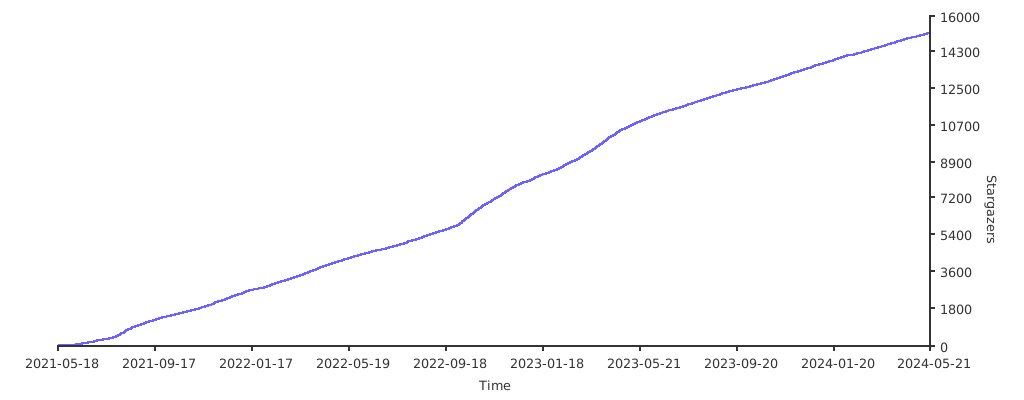](https://starchart.cc/vaxilu/x-ui)
|